Open source CLI
$0
MIT licensed · available today
- Complete migration engine
- Selective skills export
- Local progress dashboard
- Pause, resume, backup, and verification
- Community support on GitHub
 For Codex
Open source now · Mac app in development
Move local Codex conversations, settings, skills, repositories, branches, worktrees, and unfinished files—without handing your workspace to a cloud migration service.
Independent migration tool. Not affiliated with or endorsed by OpenAI.
Inside the alpha
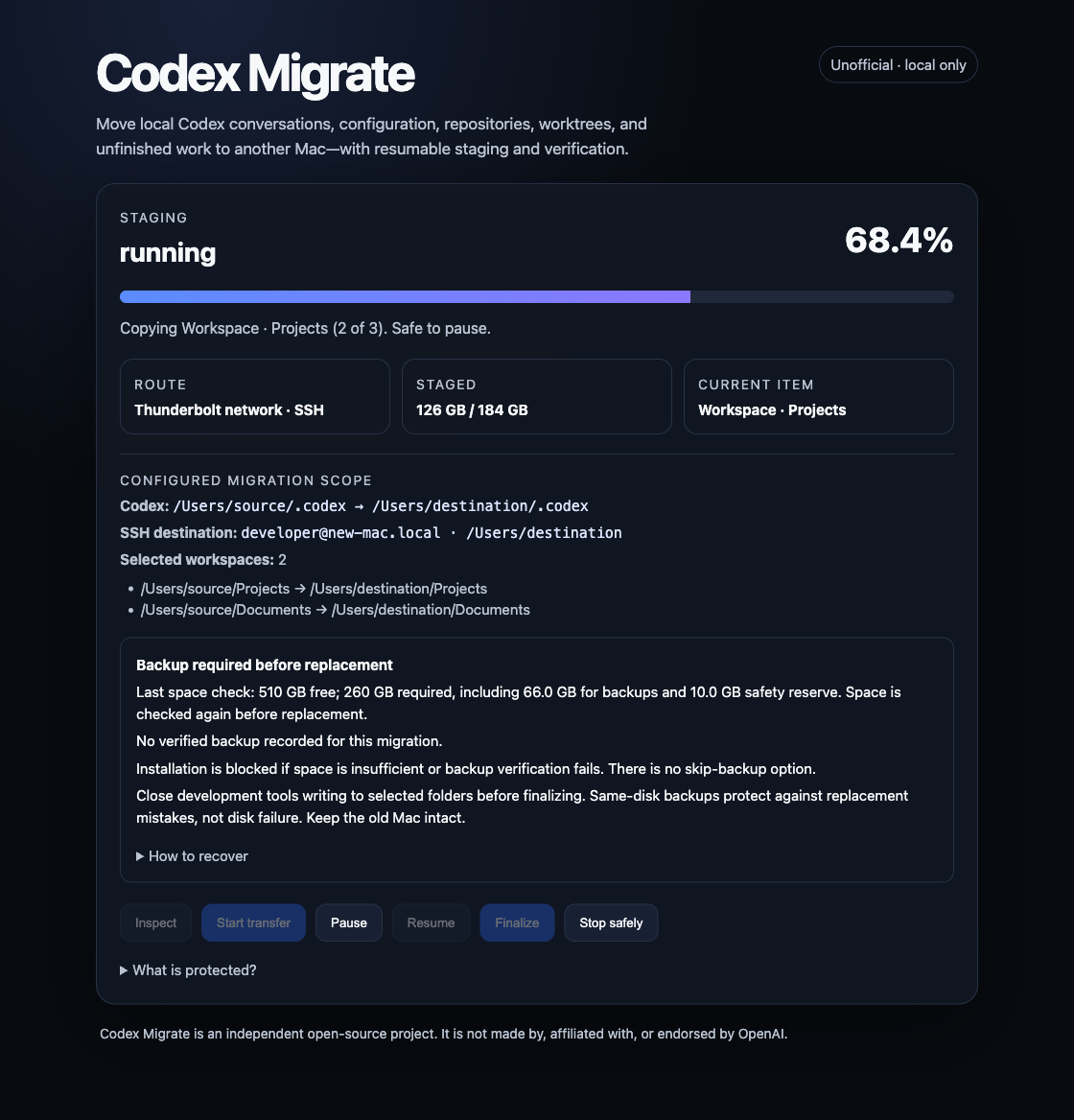
The local dashboard shows the connection, copied data, selected folders, and backup checks. Pause or stop safely during staging, then resume when you’re ready.
Built after the hard version
Signing in on a new Mac does not recreate every piece of local working state. Codex Migrate inventories what exists, moves it over a connection you control, preserves the new Mac's identity, and proves the result before calling it done.
See exactly what will move, how large it is, and whether both Macs are ready. Planning mode changes nothing.
Move your workspace over Wi-Fi or a compatible USB-C/Thunderbolt network connection. Both use secure SSH. Pause and resume without starting over.
Verify a destination backup before replacement. Insufficient space or failed verification blocks installation. Keep an independent backup too.
Compare conversation counts, check databases, and produce a readable receipt of what arrived.
The whole working environment
Selected workspace roots move byte-for-byte, including the work that has not reached a remote yet.
One engine. Two ways to use it.
The full migration engine stays free and inspectable. The paid edition is for people who want a signed Mac experience and maintainer support.
Open source CLI
$0
MIT licensed · available today
Mac app · v1 license
$50
One payment · no subscription
Not on sale yet. No pre-orders. The $50 downloadable edition is in development. Checkout opens only after signing, notarization, clean-Mac testing, and download delivery are verified. The free CLI is available today.
Support is best-effort. We aim to respond within a few business days, depending on availability and complexity. Each issue is handled case by case; no response time, fix, or resolution deadline is guaranteed.
Your request goes to Josh’s inbox via SendGrid. No payment, preorder, or newsletter. Email Josh to opt out. Privacy.
Want to discuss an early unsigned build? Email Josh. Requests are considered case by case. These are unnotarized test builds, not the finished paid app; access is not guaranteed. Don’t email credentials or workspace contents.
“I changed Macs, signed in, and discovered the working environment I depended on had not followed me. Migration Assistant stalled. So I built the missing migration path, used it on a 400+ GB workspace, and opened the engine.”
— Joshua Segeren, creator of Codex Migrate
Plan your move
Conversations, skills, repositories, and unfinished work: what to select and what to check before retiring the old Mac.
What happens before existing files are replaced—and why the app stops if it cannot make a verified backup.
Straight answers
No. Codex Migrate is an independent compatibility project. It is not affiliated with, supported by, or endorsed by OpenAI.
No. Authentication and installation identity are deliberately excluded. You sign in on the new Mac first; the migration preserves that new identity.
Yes. Use Wi-Fi or a compatible USB-C/Thunderbolt network connection between your Macs; Ethernet works too. The transfer uses secure SSH in each case. USB-C cables vary in capability and speed, so the cable setup must provide a working network connection—not just charging. Enable Remote Login on the new Mac, then follow the connection guide.
Not yet. The $50 downloadable Mac edition is in development. We are not taking pre-orders. The complete open-source CLI is usable today.
Not yet. Codex Migrate currently supports Mac-to-Mac migration only, including the open-source CLI. A Windows version is feasible, but it needs its own work on file locations, permissions, backups, packaging, and recovery testing. Windows and cross-platform transfers are not supported today, and there is no announced release date.
Rerun it. Staging uses resumable transfer semantics, so completed data is reused. The source Mac is never deleted or modified.
Yes. Personal and repository-scoped skills can already be exported independently; more selective components will use the same guarded workflow.
Best-effort support, with an initial response target of a few business days, not a guaranteed fix or service level. When sales open, purchases will have a 30-day refund window. See the refund policy.
Keep your source. Verify the move.